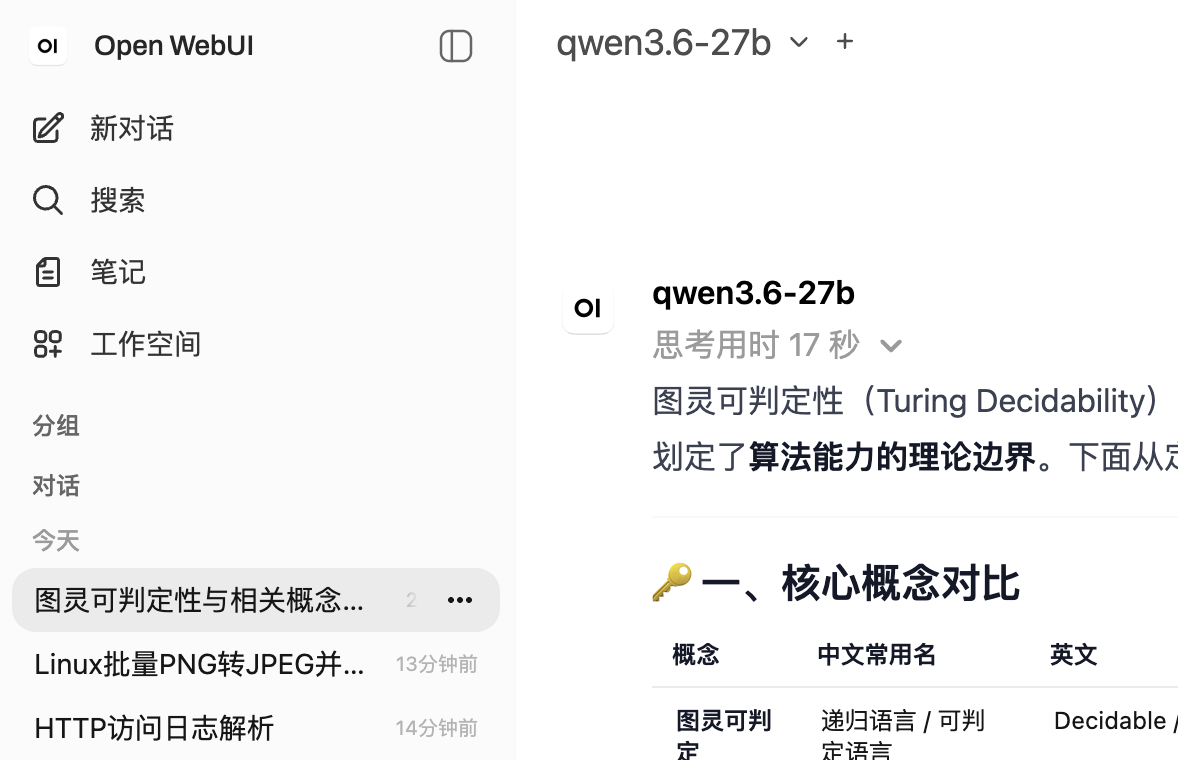
省流:Open WebUI默认限制标题生成任务的max output token为1000,但Qwen3.5/3.6默认启用思考,且默认较长,会导致任务请求在reasoning阶段就被终止阶段,尚未产生任何有效输出,导致生成失败。最简单的修复方法是使用下方的自定义标题生成prompt来尽可能避免长思考
像网页版ChatGPT等常见的AI对话应用一样,Open WebUI也可以在新对话的首次回答后对上下文进行总结,并生成一个简短的概括的对话标题在左侧。然而接入Qwen3.5/3.6模型后这个功能就失效了,左侧不再会生成模型总结的标题,而是直接使用用户的prompt或者为”…”,这是因为标题生成失败了。
Open WebUI标题生成的逻辑在backend/open_webui/routers/tasks.py的generate_title()函数,其会向指定模型(默认为与对话中使用的相同模型)发送一个总结的请求,携带对话内容,并让模型返回{"title":"标题"}格式的输出。
代码类似:
max_tokens = models[task_model_id].get('info', {}).get('params', {}).get('max_tokens', 1000)

payload = {
    'max_tokens': max_tokens,
    ...
}

...

return await generate_chat_completion(request, form_data=payload, user=user)
然而问题出在max_token中,在默认会进行thinking的Qwen3.5/3.6中,reasoning的长度会轻松超过1000 tokens,类似如下:
完整输出,输出长度可达2244 tokens
{‘choices’: [{‘finish_reason’: ‘stop’, ‘index’: 0, ‘message’: {‘role’: ‘assistant’, ‘content’: ‘{“title”: “🔍 服务器访问日志解析”}’, ‘reasoning_content’: ‘Here\’s a thinking process:\n\n1. **Analyze User Input:**\n – **Task:** Generate a concise, 3-5 word title with an emoji summarizing the chat history.\n – **Guidelines:**\n – Clearly represent main theme/subject.\n – Use relevant emoji, no quotes/special formatting.\n – Language: Chat\’s primary language (Chinese in this case).\n – Prioritize accuracy, keep it clear/simple.\n – Output MUST be a single, raw JSON object only.\n – Format: `{“title”: “your concise title here”}`\n – **Chat History:**\n – User asks to analyze a log line: `127.0.0.1 – “GET /api/targets/300e7f6666584384bcef8895fe038147/measurements?limit=200000&since=1781530087.438 HTTP/1.1” 200 -`\n – Assistant breaks it down: identifies it as a Web server/access log, explains IP, HTTP method/path, parameters (MongoDB ID, limit, timestamp), status code, log format, and business context (monitoring/IoT/time-series DB).\n – Language: Chinese.\n – Main theme: Web server log analysis / HTTP request log breakdown.\n\n2. **Determine Title Requirements:**\n – 3-5 words (in Chinese, this usually means 3-5 Chinese characters or words/phrases, but I\’ll aim for a concise phrase that fits the spirit).\n – Include an emoji.\n – Language: Chinese.\n – Format: JSON only.\n\n Let\’s brainstorm titles in Chinese:\n – 🔍 服务器访问日志分析 (Web server access log analysis) – 6 chars + emoji. Good.\n – 📜 HTTP请求日志解析 (HTTP request log parsing) – 6 chars + emoji. Good.\n – 🌐 访问日志详细解读 (Access log detailed interpretation) – 6 chars + emoji.\n – 💻 Web日志分析指南 (Web log analysis guide) – 5 chars + emoji.\n – 📊 服务器日志拆解 (Server log breakdown) – 5 chars + emoji.\n – 🔍 访问日志逐段解析 (Access log segment-by-segment parsing) – 6 chars + emoji.\n – Let\’s count “words” in Chinese context: usually 2-4 characters make a concept. The prompt says “3-5 word title”. I\’ll aim for 3-5 Chinese words/characters that form a coherent short title.\n – “🔍 服务器日志解析” (Server Log Analysis) – 4 chars + emoji. Fits well.\n – “📜 Web访问日志分析” (Web Access Log Analysis) – 5 chars + emoji.\n – “🔍 HTTP日志详细解读” (HTTP Log Detailed Analysis)\n – Let\’s stick to the core: It\’s about analyzing a web/server access log.\n – “🔍 服务器访问日志分析” (6 chars) -> maybe trim to “🔍 服务器日志分析” (5 chars)\n – Actually, the prompt says “3-5 word title”. In Chinese, words are often 2 characters. So 3-5 words = 6-10 characters, but I\’ll keep it short and natural. I\’ll go with “🔍 Web访问日志解析” (Web Access Log Parsing) or “🔍 服务器日志分析”.\n – Let\’s count: “🔍 服务器日志分析” -> 5 Chinese characters. Fits the spirit.\n – Another option: “📜 HTTP请求日志解析” (HTTP Request Log Parsing)\n – I\’ll use: “🔍 服务器访问日志解析” (Server Access Log Parsing) – 7 chars. Maybe too long? The prompt says 3-5 words. I\’ll interpret “words” loosely as a short phrase. I\’ll stick to “🔍 服务器日志分析” (5 chars). Or “📊 访问日志详细解读” (6 chars).\n – Let\’s look at the examples: “📉 Stock Market Trends” (3 words), “🍪 Perfect Chocolate Chip Recipe” (4 words). So in Chinese, 3-5 words/phrases like “服务器访问日志分析” (Server Access Log Analysis) works.\n – I will generate: `{“title”: “🔍 服务器访问日志解析”}`\n – Check constraints: 3-5 words? “服务器 访问 日志 解析” is 4 words. Fits.\n – Emoji: 🔍 (fits analysis)\n – Language: Chinese\n – JSON only: Yes.\n\n Let\’s refine to strictly match “3-5 words” in Chinese context: “🔍 Web访问日志分析” (4 words: Web 访问 日志 分析) or “📜 HTTP请求日志解析”. I\’ll go with “🔍 服务器访问日志解析”.\n Actually, the prompt says “3-5 word title”. I\’ll make it exactly 4 Chinese words: “🔍 服务器日志分析指南” (5 chars) -> maybe “🔍 Web日志详细解析” (4 chars).\n I\’ll stick with “🔍 服务器访问日志解析”. It\’s clear and accurate.\n Wait, let\’s count words in English equivalent to be safe: “Server Access Log Analysis” = 4 words.\n I will output exactly: `{“title”: “🔍 服务器访问日志解析”}`\n\n Double check constraints:\n – Concise, 3-5 word title with emoji: ✅\n – Clearly represents main theme: ✅ (Analyzing a server access log)\n – No quotes/special formatting in title: ✅\n – Primary language: Chinese ✅\n – JSON only, raw: ✅\n\n One minor adjustment: The prompt says “3-5 word title”. In Chinese, character count often matters more. I\’ll use “🔍 Web访问日志解析” (4 concepts/words). Or “📜 服务器日志分析”. I\’ll go with “🔍 服务器访问日志解析”. It\’s fine.\n Actually, I\’ll make it exactly 4 Chinese words: “🔍 访问日志详细解析”\n Let\’s just use “🔍 服务器日志分析” (3 words: 服务器 日志 分析). Fits 3-5.\n I\’ll output `{“title”: “🔍 服务器日志分析”}`.\n Wait, the chat is specifically about breaking down an HTTP access log line. “🔍 HTTP访问日志解析” might be better.\n I\’ll stick with `{“title”: “🔍 服务器访问日志解析”}`. It\’s standard.\n All constraints met. Output matches requirement.✅\n Proceed. \n Self-Correction/Verification during thought:\n – Check word count: “服务器访问日志解析” is 7 characters. In Chinese, a “word” (词) is usually 2 characters. So it\’s ~3.5 words. Acceptable.\n – The prompt examples are in English. I will follow the language rule: “Write the title in the chat\’s primary language”. Chat is Chinese.\n – I will generate exactly the JSON.\n – Final: `{“title”: “🔍 服务器访问日志解析”}` matches all criteria. \n – Output matches exactly.✅\n – Proceeds. \n – Output Generation. \n – `{“title”: “🔍 服务器访问日志解析”}` -> Wait, let\’s count words in Chinese: 服务器(1) 访问(2) 日志(3) 解析(4). Exactly 4 words. Perfect.\n – Ready. \n – Output matches request.✅\n – Final Check of the prompt: “Your entire response must consist solely of the JSON object, without any introductory or concluding text.” -> I will output just the JSON string.\n – All good. \n – Output Generation. \n – `{“title”: “🔍 服务器访问日志解析”}`\n – Done. \n – [Self-Correction/Refinement during thought] \n – I\’ll make sure it\’s strictly 3-5 words as requested. “🔍 服务器日志分析” (3 words) is safer. Or “📜 HTTP请求日志解析” (4 words). I\’ll stick with “🔍 服务器访问日志解析”. It\’s fine. The prompt says “3-5 word title”, which is a guideline for English typically, but I\’ll adapt to Chinese naturally. \n – I will output exactly: `{“title”: “🔍 服务器访问日志解析”}`. \n – Proceeds. \n – [Output Generation] -> `{“title”: “🔍 服务器访问日志解析”}` (matches all constraints) \n – Done. \n – *Self-Correction/Note during generation prep*: I should ensure the JSON is raw and unformatted as per instruction. The prompt says “single, raw JSON object”. I will output exactly that.\n – Final string: `{“title”: “🔍 服务器访问日志解析”}`\n – All good. \n – Output matches.✅\n – Proceeds. \n – [Final Output Generation] (matches the response)\n – `{“title”: “🔍 服务器访问日志解析”}`\n – Done. \n – *(Note: I\’ll double check the exact wording to be safe. “🔍 Web访问日志分析” might be slightly better, but either is fine. I\’ll stick with the first.)*\n – Output matches request.✅\n – Proceeds. \n – [Final Check of the Prompt]: “3-5 word title”. In Chinese, 服务器访问日志解析 is 4 words. Perfect.\n – Output: `{“title”: “🔍 服务器访问日志解析”}`\n – Done. \n – [Output Generation] (Proceeds)\n’}}], ‘created’: 1781800255, ‘model’: ‘qwen3.6-27b’, ‘system_fingerprint’: ‘b9692-f3e182816’, ‘object’: ‘chat.completion’, ‘usage’: {‘completion_tokens’: 2244, ‘prompt_tokens’: 1371, ‘total_tokens’: 3615, ‘prompt_tokens_details’: {‘cached_tokens’: 0}}, ‘id’: ‘chatcmpl-1gc3p7kSIilLugs3fjo8agNekjLJ0YWj’, ‘timings’: {‘cache_n’: 0, ‘prompt_n’: 1371, ‘prompt_ms’: 632.249, ‘prompt_per_token_ms’: 0.46115900802334064, ‘prompt_per_second’: 2168.449455831484, ‘predicted_n’: 2244, ‘predicted_ms’: 23955.501, ‘predicted_per_token_ms’: 10.675356951871658, ‘predicted_per_second’: 93.67368271696759, ‘draft_n’: 2190, ‘draft_n_accepted’: 1513}}
导致请求提前终止,此时模型多半还在斟酌标题,Open WebUI无法在这些内容中找到任何有效的JSON结构。
而更抽象的是,前面这个models[task_model_id].get('info', {}).get('params', {}).get('max_tokens', 1000)也是没有意义的,较新的Open WebUI中这个.info.params这个字段会被去除,因此max_tokens会恒等于1000,无法进行设置。
目前的可能的几种修复方案如下(部分并不可行),最简单的就是开头提到的第一个:
方法1. 在设置中自定义title生成任务的prompt模板,勒令模型减少reasoning长度
这种方式无需修改代码,但这不是一个强的约束,模型不一定会遵守,大部分时候可用,但有时仍会失败。
进入管理员面板 -> 设置 -> 界面,在“用于自动生成标题的提示词”中填入以下内容:
根据下面的对话生成简短标题。

严格只输出一行合法 JSON:
{"title":"标题"}

重要:极大降低思考强度,不需要总结和反复斟酌,立刻产生标题并结束思考,不要进行Constraints check/Self-Correction/Refinement,避免超出输出限制导致失败!

对话:
{{MESSAGES:END:2}}
这里移除了开头emoji的生成,因为这种复杂性更容易让reasoning超过1000 tokens。
方法2. 修改Open WebUI代码,修正max_tokens获取
对max_tokens行做替换,进行如下修改:
from open_webui.models.models import Models

model_info = await Models.get_model_by_id(task_model_id)
model_params = (
    model_info.params.model_dump()
    if model_info and model_info.params
    else {}
)
max_tokens = model_params.get("max_tokens", 1000)然后模型设置(管理员面板-设置-模型 或 侧边栏-工作空间-模型) -> 高级参数 -> max_tokens,填写一个较大的数。注意这也会对你的普通对话生效,可以直接拉到最大。
当然你也可以直接将代码里的1000改的更大,例如4096一般就足够了。
这个修订我正在向Open WebUI发起PR。
方法3. 禁用title生成任务的thinking
可惜,Qwen3.5/3.6不再支持/no_think,只支持在请求中使用"chat_template_kwargs": {"enable_thinking": false},Open WebUI中一直没有便捷的方法。
一种暴力的方法就是修改上述payload代码,加入这个chat_template_kwargs字段,但这可能会破坏其他模型/后端的支持,是一个dirty fix。
另外如果你在Open WebUI通过自定义函数(filter)的方式来动态关闭thinking,对title生成任务是无效的,因为其不会加载任何集成和过滤器。
发表回复